


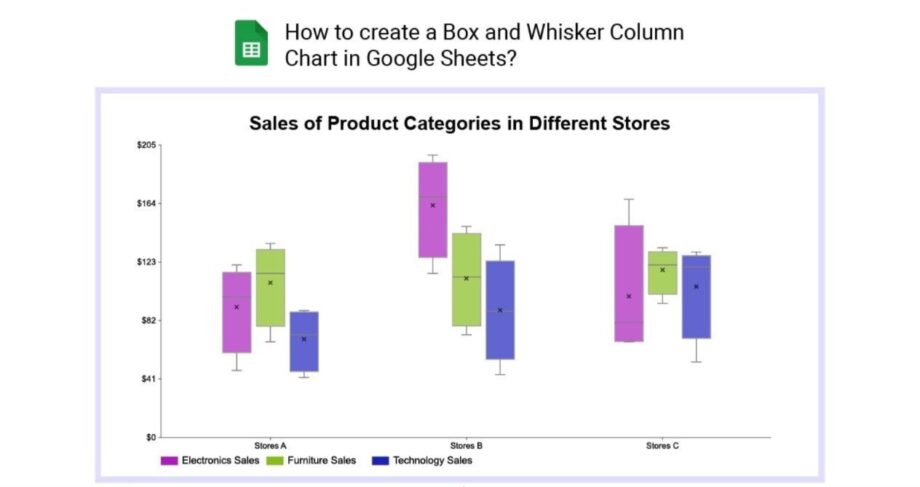
The new chart type turns raw numbers into a distribution summary without helper formulas, while improving how charts move between Sheets and Excel.
Google Sheets is gaining native box and whisker charts, giving users another way to compare datasets beyond averages and totals.
Select raw numeric data, and Sheets calculates the minimum, quartiles, median, maximum, mean and outliers automatically. Users can choose inclusive or exclusive quartile calculations and control the visibility of individual points, outliers and mean indicators.
The addition could simplify work for people who need to understand how widely values vary, rather than show only a single headline number.
Why box and whisker charts are useful
Two groups can have the same average while looking very different underneath.
Consider these illustrative datasets:
- Group A: 48, 49, 50, 51, 52
- Group B: 10, 30, 50, 70, 90
Both have an average of 50. However, Group A is tightly clustered, while Group B spreads across a much wider range.
A box plot helps reveal that difference. The box represents the middle half of the observations, and a line marks the median. Whiskers and separately displayed points help describe the remaining spread, depending on the chart’s calculation rules.
That makes the format useful for comparing exam scores, delivery times, survey responses or manufacturing measurements. Averages still matter, but they do not tell the whole story.
Excel charts should now survive imports
Google says box and whisker charts imported from Excel will retain their data references, calculations and formatting. Previously, those charts were dropped during import.
Charts created in Sheets can also be exported to Excel as editable box and whisker charts.
For teams sharing spreadsheets across both applications, this could reduce the need to rebuild charts or replace them with static images.
Important reports still deserve a check after conversion. Confirm that each chart points to the intended data and that its labels and statistical settings match the analysis.
When will the feature reach your account?
| Release track | Rollout begins | Expected rollout window |
|---|---|---|
| Rapid Release | October 22, 2026 | Up to 15 days |
| Scheduled Release | November 6, 2026 | Up to 15 days |
Google lists availability for all Workspace customers and personal Google accounts, with no administrator control required. The staged rollout means the option may not appear immediately.
What to check before sharing a box plot
Automatic calculations remove preparation work, but they do not decide whether the underlying comparison is meaningful.
Use consistent units, label each group clearly and check the number of observations behind each box. A small dataset and a large dataset can produce similarly shaped summaries while supporting different levels of confidence.
Keep the quartile method consistent when comparing results across files. Different calculation conventions can produce different boundaries, particularly with small samples.
Finally, treat an outlier as a value to investigate. It may represent a recording mistake, an unusual but valid observation or an important exception. Removing it simply because it sits outside the main cluster can conceal useful information.