

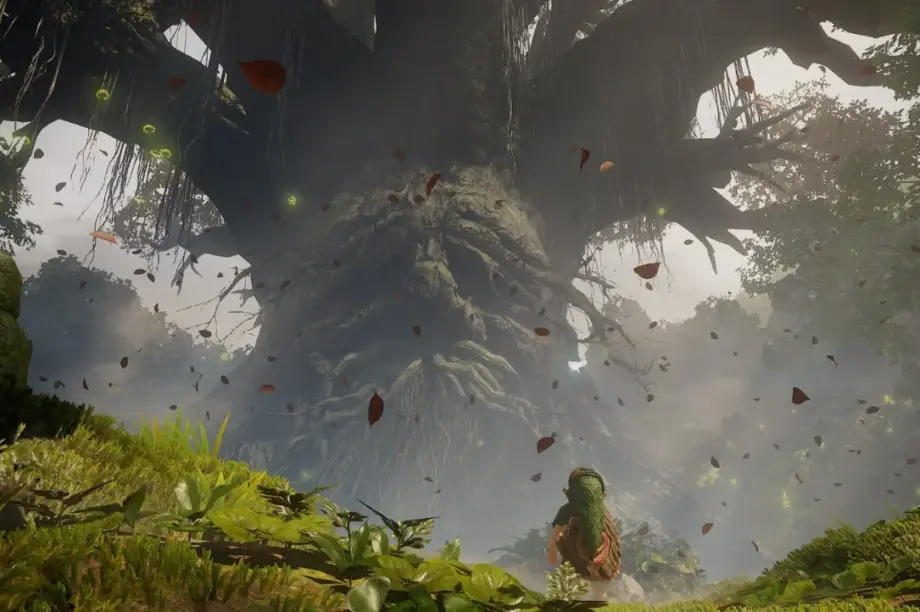
An unofficial native Windows port of The Legend of Zelda: Ocarina of Time remake has reportedly appeared just days after the game’s Nintendo Switch 2 launch. Developed under the name NX2navi, the project uses static recompilation instead of traditional console emulation and claims support for 5K resolution, DLSS, FSR 3.1, HDR, ultrawide monitors and frame rates up to 240 FPS.
The Legend of Zelda: Ocarina of Time remake has reportedly received an unofficial native PC port less than a week after its release on Nintendo Switch 2.
According to a report by TechPowerUp, a GitHub developer using the name tangerineturtle1 has introduced NX2navi, a Windows-focused project that converts the game’s code into a form that can run natively on x86-64 PC hardware.
Unlike traditional Nintendo Switch 2 emulators, NX2navi reportedly uses a technique known as static recompilation.
The project also includes a custom Vulkan rendering system and support for several modern graphics technologies, including Nvidia DLSS, AMD FidelityFX Super Resolution (FSR) 3.1 and HDR.
The developer claims the port can support resolutions up to 5K, refresh-rate options reaching 240 FPS and ultrawide aspect ratios.
However, NX2navi is an unofficial fan-made project rather than a Nintendo-authorised Windows release.
It remains in early development, with known issues including visual glitches, occasional crashes and temporary stuttering.
The project also requires users to supply their own game data, raising questions about copyright, console security protections and the legal status of extracting games from supported hardware.
Zelda: Ocarina of Time Remake Gets an Unofficial Windows Port
The Legend of Zelda: Ocarina of Time remake was released for Nintendo Switch 2 on November 5, 2026, according to the Nintendo developer interview supplied with the report.
Only days later, the game reportedly became playable on Windows through the NX2navi project.
The developer has published the project through GitHub, describing a native port built using static recompilation.
This approach differs from the conventional method of running console games through an emulator.
Instead of recreating the console environment and translating instructions during gameplay, static recompilation converts the relevant executable code ahead of time.
The resulting application can then run using native PC instructions, with additional software handling the game’s interaction with graphics and other system components.
NX2navi reportedly uses a custom Vulkan renderer to display the game.
The technique can offer opportunities for PC-specific improvements, although performance still depends on implementation quality and hardware compatibility.
Nintendo has not announced an official Windows version of the remake in the supplied information.
What Is NX2navi?
NX2navi is an unofficial PC porting project developed by the GitHub user tangerineturtle1.
According to the supplied report, the project is designed to transform the Nintendo Switch 2 version of the Ocarina of Time remake into a Windows-compatible application.
The project does not distribute the game’s original content.
Instead, it expects users to provide a compatible copy of the necessary game data.
The reported supported version is 1.1.1.
The local build process reportedly takes approximately 10 to 25 minutes during initial preparation, depending on system performance.
However, the repository’s current requirements and compatibility status should be checked directly before relying on these details.
NX2navi should not be confused with an official game release or a standalone, legally licensed PC edition.
NX2navi PC Port: Key Details
| Feature | Reported details |
|---|---|
| Game | The Legend of Zelda: Ocarina of Time remake |
| Original platform | Nintendo Switch 2 |
| Original release date | November 5, 2026 |
| PC project | NX2navi |
| Developer | tangerineturtle1 |
| Target operating system | Windows |
| Technology | Static recompilation |
| Target architecture | x86-64 |
| Graphics API | Vulkan |
| Supported game version | 1.1.1 |
| First-time build duration | Approximately 10–25 minutes |
| Maximum reported resolution | Up to 5K |
| Frame-rate options | Default 60 FPS, configurable up to 240 FPS or uncapped |
| Upscaling | DLSS and FSR 3.1 |
| Frame generation | FSR 3.1 frame generation reported |
| HDR | Supported according to report |
| Ultrawide formats | 21:9 and 32:9 |
| Development status | Early development |
The listed capabilities are developer and media claims, not independently verified test results.
How Static Recompilation Works
Static recompilation is the central technology behind NX2navi.
A traditional emulator attempts to reproduce the behaviour of a console environment on another platform.
Depending on its design, it may interpret or dynamically translate instructions while the game runs.
That process can introduce compatibility challenges and additional computational overhead.
Static recompilation takes a different approach.
It converts executable code ahead of time into instructions suitable for the target platform.
For NX2navi, the intended destination is an x86-64 Windows PC.
The project reportedly combines the recompiled code with a custom rendering system and supporting components.
This can make it possible to implement PC-specific features that were not available in the original console release.
However, static recompilation is not an automatic guarantee of better performance.
Developers still need to reproduce or replace platform-dependent behaviour, including graphics, memory handling, audio, timing and other services.
Compatibility problems may remain even when the game executes as a native application.
Static Recompilation vs Nintendo Switch 2 Emulation
The difference between the two methods is important for understanding why NX2navi has attracted attention.
| Feature | Traditional console emulation | Static recompilation |
|---|---|---|
| Basic approach | Recreates compatible console behaviour | Converts executable code ahead of execution |
| Instruction translation | May occur while the game runs | Performed during a separate preparation stage |
| Initial setup | Depends on emulator and game | May require a dedicated compilation process |
| Game compatibility | One emulator may support many games | Often requires game-specific work |
| Rendering | Uses an emulator’s graphics translation system | Can use a dedicated native renderer |
| Performance | Depends on implementation and hardware | Depends on recompilation, supporting code and hardware |
| PC enhancements | May be supported | May be supported |
| Legal considerations | Depend on software, files and jurisdiction | Depend on software, files and jurisdiction |
Neither approach automatically establishes a legal right to copy or distribute copyrighted game content.
The specific circumstances of the software, game files and applicable law matter.
NX2navi Supports 5K Resolution and Up to 240 FPS
One of the project’s most prominent claims concerns improved display flexibility.
According to TechPowerUp, NX2navi supports resolutions beyond 1440p, extending up to 5K.
The project reportedly includes configurable frame-rate settings, with 60 FPS as the default.
Users can reportedly select a higher frame-rate cap reaching 240 FPS or choose an uncapped setting.
These settings could be useful for owners of high-refresh-rate gaming monitors.
However, the availability of a 240 FPS option does not mean every computer can sustain 240 FPS during gameplay.
Actual frame rates depend on the processor, graphics card, rendering workload, software optimisation and game engine behaviour.
The supplied report does not include independently verified performance results across a range of PC configurations.
High-refresh-rate operation may also reveal timing problems in games originally designed for a different performance target.
Users should therefore treat the advertised limits as supported options rather than guaranteed performance.
DLSS and FSR 3.1 Support Reported
NX2navi also reportedly supports modern image upscaling technologies.
The project includes Nvidia DLSS support for compatible RTX graphics cards.
It also claims support for AMD FidelityFX Super Resolution 3.1 and FSR frame generation on compatible GPUs.
These technologies are intended to improve the balance between image quality and rendering performance.
Upscaling generally renders an image at one resolution before reconstructing it at a higher output resolution.
Frame generation creates additional displayed frames using information from rendered frames.
However, generated frames are not equivalent to additional game simulation updates.
Higher displayed frame rates do not necessarily provide a proportional reduction in input latency.
The effectiveness of DLSS and FSR also depends on the implementation and the performance of the underlying game.
The supplied report does not provide a detailed image-quality comparison.
Does NX2navi Support HDR?
According to the developer information described by TechPowerUp, HDR is supported.
HDR can potentially provide a wider range of brightness and colour information on compatible displays.
However, the report does not establish which HDR output modes are supported or how accurately the game’s visuals are presented.
Users would need compatible hardware and an appropriate software configuration to take advantage of the feature.
Ultrawide Monitor Support: 21:9 and 32:9
Another reported feature is support for ultrawide displays.
NX2navi is said to accommodate both 21:9 and 32:9 aspect ratios.
These formats provide a wider viewing area than a conventional 16:9 display.
According to the report, the game interface remains positioned within a 16:9 area while the surrounding presentation can take advantage of the additional width.
This approach may help preserve the readability of health indicators, menus and other interface elements.
However, widescreen support can introduce visual challenges if game environments, camera behaviour or interface components were originally designed around a narrower field of view.
The supplied reporting does not establish whether every gameplay sequence and cutscene renders correctly at ultrawide resolutions.
NX2navi Minimum PC Requirements
The unofficial Windows port has relatively demanding reported requirements.
According to TechPowerUp, NX2navi needs at least 16GB of system memory and approximately 30GB of storage.
The graphics card must support Vulkan 1.3 and mesh shaders.
Reported PC Requirements
| Component | Requirement |
|---|---|
| Operating system | Windows |
| CPU architecture | x86-64 |
| RAM | 16GB |
| Storage | Approximately 30GB |
| Graphics API | Vulkan 1.3 |
| GPU feature | Mesh shader support |
| DLSS | Compatible Nvidia RTX GPU |
| HDR | Compatible display and graphics setup |
| GPU VRAM | No verified universal minimum supplied |
The report does not provide a complete supported-GPU list or a verified minimum processor specification.
Consequently, readers should not assume that any graphics card advertising Vulkan support will necessarily work.
Vulkan 1.3 compatibility and mesh shader support must both be considered.
RTX 5090 Testing Reportedly Used 18.6GB of VRAM
The supplied report mentions an earlier demonstration using Nvidia’s GeForce RTX 5090.
That showcase reportedly consumed approximately 18.6GB of video memory.
However, a newer demonstration is said to show substantially lower memory usage.
The report does not provide a directly comparable set of testing conditions for the two figures.
VRAM consumption can vary according to resolution, texture allocation, caching, rendering settings and software changes.
A single early-development result should therefore not be presented as the port’s permanent graphics memory requirement.
More consistent testing would be needed to establish practical GPU recommendations.
Known Issues: Crashes, Visual Bugs and Stuttering
Although NX2navi reportedly supports numerous PC enhancements, the project is still described as being in early development.
Several issues remain unresolved.
According to the supplied report, known problems include visual bugs, occasional crashes and short stutters when entering new areas.
These limitations are not unusual for experimental software that adapts a game to an entirely different platform.
The project must account for hardware behaviour and rendering assumptions made for the original console.
Issues may also vary between different PC configurations.
The developer has not established a universal timeline for eliminating all known problems.
Users should therefore not treat NX2navi as a fully tested replacement for the official Nintendo Switch 2 release.
Zelda Remake Was Reportedly Running Through Emulation on Launch Day
The unofficial native port follows earlier reporting that the Ocarina of Time remake was already running through a Nintendo Switch 2 emulator on its launch day.
According to TechPowerUp, the initial emulation experience suffered from performance problems.
NX2navi reportedly represents a different approach to bringing the game to PC.
Rather than relying on a general-purpose emulator, the project uses game-specific recompilation and rendering components.
However, the supplied report does not establish that NX2navi consistently outperforms every available emulator across comparable hardware.
Such a conclusion would require controlled benchmarks using identical test systems and workloads.
The more defensible distinction is technical: NX2navi is a native recompilation project rather than a conventional Switch 2 emulator.
Fan-Made Native PC Ports Are Becoming More Common
NX2navi follows a growing number of community-developed projects designed to bring console games to modern PC platforms.
One example is Zelda 64: Recompiled, which brought a native recompilation-based version of Majora’s Mask to PC in 2024.
Another is Unleashed Recompiled, a fan project associated with the Xbox 360 version of Sonic Unleashed.
These projects demonstrate how developers can adapt older game code for new platforms while adding modern display and performance options.
TechPowerUp also reports that RecompLauncher has gathered nearly 200 fan-made console ports into a single catalogue.
However, NX2navi is notable for its timing.
Unlike projects adapting games released many years earlier, the Ocarina of Time remake reportedly received its unofficial PC port within days of its Nintendo Switch 2 launch.
That short interval has drawn attention to the project’s technical approach and potential legal implications.
Nintendo Copyright and Legal Concerns
The report also raises questions about Nintendo’s response to unofficial PC ports.
Nintendo has previously taken legal action involving console emulation, game distribution and circumvention-related activities.
One prominent case involved Yuzu, whose developers agreed to pay $2.4 million and discontinue the emulator in 2024.
Ryujinx later ceased operations following contact involving Nintendo, according to the supplied historical reporting.
However, these cases do not automatically determine the legal position of NX2navi.
Different projects use different software, distribution methods and technical approaches.
The legal implications can depend on copyright law, technical protection measures, licence restrictions and the jurisdiction involved.
NX2navi reportedly does not include Nintendo’s copyrighted game files.
That distinction is relevant, but it does not establish that every method of obtaining, converting or using game data is lawful.
Owning a game cartridge or digital copy also does not automatically authorise bypassing security protections.
The project’s reported requirement for user-supplied game data may create additional practical and legal considerations.
TechLayers does not recommend downloading unauthorised game copies or bypassing console security measures.
Is NX2navi an Official Nintendo PC Port?
No.
NX2navi is an independent project published by a third-party developer.
It is not described as a Nintendo-authorised Windows release.
The official Ocarina of Time remake was released for Nintendo Switch 2 on November 5, 2026, according to the supplied Nintendo interview.
The existence of an unofficial native port should not be interpreted as an announcement of an official Nintendo PC version.
Nintendo has not confirmed support for NX2navi in the supplied information.
Why This Project Matters for PC Gaming
The reported NX2navi project demonstrates how quickly experimental porting technology can be applied to modern console games.
Its combination of static recompilation, Vulkan rendering, upscaling and expanded display options illustrates the flexibility that developers may achieve through game-specific native implementations.
However, the project also highlights several unresolved issues.
Technical compatibility remains incomplete, and performance claims require independent testing.
The distribution and use of copyrighted game data raise separate legal questions.
For now, the significance of NX2navi lies primarily in its engineering approach rather than its suitability as a stable consumer release.
The key development is that an unofficial native Windows adaptation of the new Zelda remake reportedly appeared within days of launch, using static recompilation instead of traditional console emulation.
TechLayers will continue following game preservation, PC gaming technology, graphics APIs and developments involving unofficial console ports.
Have a story tip or feedback? Contact [email protected].
© TechLayers. Original editorial content.