


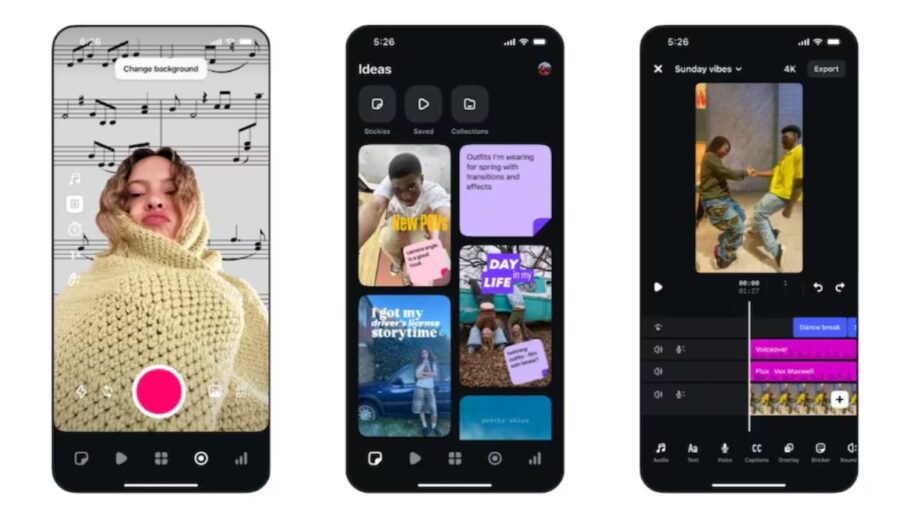
Instagram has introduced a macOS version of its Edits video creation app, bringing multi-track editing, advanced colour grading, keyframe controls and watermark-free 4K exports to desktop users. The free application supports Apple silicon Macs starting with the M1 chip, while Windows users will have to wait.
Instagram is expanding its video creation tools beyond smartphones with the launch of Edits for Mac, a desktop version of its video editing application designed for creators who want more control over their projects.
The Meta-owned platform is bringing several professional-style editing features to macOS, including a multi-track timeline, keyframe animation, colour correction tools, custom fonts and advanced audio controls.
The application also supports video exports at resolutions up to 4K without watermarks, alongside direct publishing to Instagram.
Unlike the mobile version, which is designed around touchscreen interactions, Edits for Mac takes advantage of larger displays, keyboard shortcuts and mouse-based controls to make complex editing tasks easier to manage.
The desktop launch comes as Instagram Edits reportedly crosses 50 million users, a little more than a year after its initial mobile release.
However, the new application is currently limited to Macs powered by Apple silicon. Instagram has not announced a Windows version.
Instagram Edits for Mac Brings Desktop Video Editing Tools
According to Brett Westervelt, product lead for Edits, the macOS application has been developed to address several limitations associated with editing videos on smartphones.
While mobile editing tools are convenient for quick changes and short-form content, working with multiple clips, effects and audio tracks on a smaller screen can become difficult.
The desktop version aims to provide a more spacious editing environment without removing the publishing features associated with Instagram.
Users can arrange multiple media elements on a timeline, make precise adjustments and manage editing assets using conventional desktop controls.
For creators producing Instagram Reels, branded videos or other social media content, the application could provide an alternative to moving between separate editing and publishing platforms.
However, Instagram has not positioned the application as a complete replacement for every professional video editing program.
The suitability of Edits for more demanding productions will depend on its supported formats, project complexity, performance and available export settings.
Multi-Track Timeline and Keyframe Controls
One of the biggest additions to Instagram Edits for Mac is its multi-track editing timeline.
A multi-track timeline allows creators to work with several visual and audio elements within the same project.
For example, a video could contain a primary footage track, additional overlay clips, text elements and multiple audio layers.
This structure makes it easier to organise more complicated edits than a simple single-track timeline.
Edits for Mac also includes keyframe controls, allowing creators to adjust how certain properties change over time.
Keyframes are commonly used to control movement, transitions and other visual effects.
A creator could, for example, use keyframes to gradually move an image across the screen or animate a visual element during a transition.
The precise range of properties supported by the app has not been fully detailed in the supplied report.
Audio Waveforms Help Synchronise Video With Music
Instagram has also added visible audio waveforms to the editing timeline.
Audio waveforms provide a graphical representation of sound, making it easier to identify changes in volume and rhythmic patterns.
This can be particularly useful when aligning video cuts with musical beats.
Creators producing dance videos, promotional clips or fast-paced Reels may find the feature useful for making more precise adjustments.
However, waveform visibility should not be confused with automatic beat detection or automatic music synchronisation, which have not been established as features in the supplied information.
Advanced Colour Grading With LUT Support
Instagram Edits for Mac introduces several colour adjustment tools typically associated with more advanced editing workflows.
The application reportedly supports colour wheels, tone curves, log conversions and user-imported Look-Up Tables (LUTs).
These tools give creators more control over the appearance of their footage.
Colour Wheels
Colour wheels allow editors to adjust colour balance across different tonal ranges.
They can be used to create warmer or cooler images, correct colour shifts or establish a consistent visual style.
Tone Curves
Tone curves provide more precise control over brightness and contrast.
Editors can use them to modify shadows, midtones and highlights while shaping the overall contrast of a video.
Log Conversions
Log footage is commonly used in video production because it can preserve flexibility for colour adjustment.
Support for log conversion could help creators working with compatible footage achieve a more conventional viewing appearance before applying further colour corrections.
However, the supplied announcement does not identify every supported log profile or camera format.
Custom LUTs
LUTs can apply predefined colour transformations to video footage.
Allowing users to import their own LUTs could help creators maintain consistent colour styling across multiple videos.
This may be particularly useful for businesses, marketing teams and independent creators who follow established visual branding guidelines.
Custom Fonts, Keyboard Shortcuts and Automatic Captions
The macOS version of Edits also introduces features intended to make repeated editing tasks more convenient.
Creators can import custom fonts, providing additional flexibility when designing titles, captions and other on-screen text.
This may help brands maintain consistent typography across videos, provided they have appropriate font licences.
The application also includes customisable keyboard shortcuts.
According to the supplied information, users can import familiar shortcut mappings from other video editing applications.
This could reduce the learning curve for editors who already use desktop editing software.
However, the exact applications and shortcut profiles supported by Edits have not been confirmed.
Automatic Captions in Multiple Languages
Instagram Edits for Mac also supports automated captions in multiple languages.
The company reportedly has not stated a numerical limit on caption generation.
However, the absence of a stated limit should not be interpreted as a guarantee of unlimited processing under every usage condition.
Automatic captions can make videos more accessible and help viewers follow content without enabling sound.
Their accuracy may vary depending on language, accents, recording quality and background noise.
Creators should review generated captions before publishing, particularly when working with technical information, names or specialised terminology.
Instagram Edits for Mac Supports 4K Exports Without Watermarks
Export capabilities are another major part of the desktop release.
Instagram says creators can export videos at resolutions up to 4K without watermarks.
This could be useful for people who publish the same video across multiple social platforms.
Watermark-free exports allow creators to distribute their finished content without a platform-specific visual mark automatically appearing over the footage.
The app also supports both vertical and horizontal aspect ratios.
Vertical video remains important for short-form social content, while horizontal layouts are useful for other video formats.
However, 4K export support does not necessarily mean every source video will contain native 4K detail.
Final quality depends on the original footage, editing settings, compression and export format.
The supplied information also does not establish every supported frame rate, codec or maximum export bitrate.
These technical details may be important for creators producing high-resolution video professionally.
Direct Instagram Publishing and Trial Reels Support
Edits for Mac is designed to connect the editing process more closely with Instagram publishing.
Users can reportedly upload completed videos directly from the application without manually exporting them and opening a separate publishing interface.
The publishing tools also support metadata such as account tags and location tags.
This could simplify the process for creators who regularly post multiple videos or manage branded content.
The app additionally supports Trial Reels.
Instagram’s Trial Reels feature allows eligible creators to test certain Reels with non-followers before deciding whether to share them more broadly.
Integrating this functionality into Edits could make it easier to move from editing to content testing without switching devices.
However, access to Trial Reels may depend on an account’s eligibility and Instagram’s current feature availability.
Direct publishing also requires users to sign in with an Instagram account.
AI Agent Integration Through Model Context Protocol
One of the more technically interesting features is support for AI agent connections through the Model Context Protocol (MCP).
MCP is a protocol designed to enable compatible AI applications to communicate with external tools and services through defined interfaces.
According to the supplied announcement, Edits for Mac can connect AI agents to assist with tasks within editing workflows.
This could potentially make certain repetitive or structured editing operations easier to manage.
However, Instagram has not provided a complete list of supported agent actions in the supplied information.
It is therefore unclear which editing commands can be performed automatically, whether actions require user approval or which AI applications are officially supported.
Creators should review the permissions requested by connected AI tools and avoid granting unnecessary access to account data or publishing functions.
The availability of MCP connectivity alone should not be treated as confirmation that the app can independently edit and publish entire projects through AI.
Mobile Assets and Text Styles Can Sync With the Mac App
Instagram has also introduced continuity between the mobile and desktop editing experiences.
According to the company, assets and text styles saved in the mobile version of Edits can be accessed through the Mac application.
This could help creators maintain consistent visual elements while working across devices.
For example, a creator may want to reuse a particular text style or design asset when editing videos on a larger screen.
However, the supplied information does not establish that complete editing timelines, unfinished projects or every project setting automatically sync between devices.
Users should distinguish between syncing creative assets and full cross-device project synchronisation until Instagram clarifies the available functionality.
Instagram Edits for Mac: System Requirements
The new application is currently exclusive to macOS.
According to the supplied launch details, users need a Mac powered by Apple silicon, beginning with Apple’s M1 chip.
This means supported machines may include compatible MacBook Air, MacBook Pro, Mac mini, iMac and other Apple silicon Mac models.
Intel-powered Macs are not included in the stated hardware requirements.
Instagram has not announced a Windows version at launch.
Instagram Edits for Mac Compatibility
| Requirement | Details |
|---|---|
| Platform | macOS |
| Minimum processor family | Apple M1 |
| Supported hardware architecture | Apple silicon |
| Intel-based Mac support | Not listed |
| Windows version | Not available at launch |
| Price | Free download |
| Account | Instagram sign-in required for syncing and direct publishing |
| Maximum export resolution | Up to 4K |
| Watermark-free export | Supported |
| Internet connection | Needed for account-based online functions |
Note: The exact minimum macOS version, memory requirements and storage requirements were not provided in the supplied report.
Users should verify these details before installation, particularly if they own an older Mac or use a managed workplace device.
How to Download Instagram Edits on Mac
Instagram says the desktop application is available as a free download through the official Edits website.
The basic installation process should involve obtaining the application from the official source, completing the macOS installation steps and signing in where required.
Before downloading, users should confirm that their Mac meets the hardware requirements.
They should also verify the authenticity of the download page rather than installing application packages from unrelated websites.
Instagram account access is needed for features such as direct publishing and syncing supported creative resources.
The supplied announcement does not establish whether every editing feature requires an active internet connection or whether offline-only workflows are fully supported.
Instagram Edits for Mac vs Mobile: What’s Different?
The desktop version expands on Instagram’s mobile editing experience with controls designed for a larger workspace.
| Feature | Edits for Mac | Edits Mobile |
|---|---|---|
| Interface | Desktop workspace | Touchscreen-focused |
| Multi-track timeline | Announced | Feature parity not fully established here |
| Keyframe controls | Announced | Not compared in supplied report |
| Advanced colour tools | Colour wheels, curves, LUTs | Feature parity not established |
| Custom keyboard shortcuts | Supported | Not applicable in the same form |
| External font import | Supported | Not compared |
| Automatic captions | Supported | Available capabilities may differ |
| Up to 4K export | Supported | Export parity not established here |
| Direct Instagram publishing | Supported | Mobile publishing workflow available |
| MCP AI agent connections | Announced | Not established here |
| Hardware | Apple silicon Mac | Supported mobile devices |
This comparison reflects the desktop launch announcement rather than a full hands-on evaluation of the two applications.
Is Instagram Edits for Mac Available in India?
The supplied announcement does not specify an India-exclusive launch schedule or any regional restrictions for the Mac application.
Indian creators with a compatible Apple silicon Mac can check the official Edits website for availability.
Because the application is described as a free download, no separate desktop purchase price has been announced.
However, individual features may depend on account eligibility, supported languages, music licensing and regional availability.
Access to licensed audio libraries, in particular, may be affected by rights agreements and permitted uses.
Creators producing commercial or sponsored content should check whether selected audio tracks are licensed for their intended publishing activity.
Why Instagram’s Desktop Editing App Matters for Creators
Instagram’s decision to bring Edits to macOS could make the platform more appealing to creators who prefer working on a desktop computer.
Smartphones are convenient for recording and sharing content, but complex editing tasks can benefit from a larger display and more precise input controls.
The introduction of multi-track editing, keyframes and advanced colour tools suggests Instagram wants Edits to support more demanding production workflows.
Direct Instagram publishing and Trial Reels integration may also reduce the number of steps required to prepare and release content.
However, the app will face competition from established desktop video editors, including both free and commercial alternatives.
Its long-term appeal will depend on performance, export controls, editing reliability, workflow compatibility and the quality of its available tools.
The biggest advantage of Instagram Edits for Mac is the combination of desktop-level editing controls and integrated Instagram publishing.
For creators already working primarily within Instagram, that integration could make the application worth exploring.
TechLayers will continue tracking updates to Edits, including any future Windows release or expanded desktop features.